








whatsapppopupnewiconGUIDE ME

Master the Fundamental Concepts of Generative AI Course. Enroll today and become a skilled Generative AI Course expert.

4.9 out of 5 based on 1587 votes
google4.2/5
Sulekha4.8/5
Urbonpro4.6/5
Just Dial4.3/5
Fb4.5/5

In collaboration with

400+

Corp. Tie-Ups

Online/Offline

Format

LMS

Life Time Access

Book A Free Counselling Session

we train you to get hired.

bag-box-form
Request more information_

  • The Master in Gen AI Course in Canada provides students with a deep understanding of Artificial Intelligence (AI) and Machine Learning (ML), with a focus on Generative AI. Master in Gen AI Training in Canada teaches the latest AI technologies, including deep learning, neural networks, and natural language processing (NLP). Students learn how to build AI systems capable of creating new data such as images, music, and text. The program covers both theoretical concepts and hands-on experience, making graduates ready to enter the fast-growing AI field.

Master in Generative AI Course in Canada

About-Us-Course

  • The Master in Gen AI Course is designed to help you:
    • Learn AI Basics: Understand the core concepts of AI, machine learning, and deep learning, including how algorithms and neural networks work.

      Master Generative AI: Dive into Generative AI, which focuses on creating new data from existing data, like generating realistic images or text.

      Hands-on Practice: Work with powerful AI tools like TensorFlow, PyTorch, and Keras to create AI models and solve real-world problems.

      Learn Natural Language Processing (NLP): Study how AI can understand and generate human language, which is used in chatbots, translation systems, and virtual assistants.

      Understand AI Ethics: Discuss the ethical issues involved in using AI, such as privacy concerns and fairness.

      Train and Optimize Models: Learn to train, test, and improve AI models to make them more efficient and accurate.

  • After completing the Master in Gen AI Course, freshers can expect:
    • Starting Salary: Freshers can expect an annual salary between CAD 80,000 - CAD 110,000 (approximately 48,00,000 - 66,00,000).

      Mid-Level Salary: With a few years of experience, salaries can rise to between CAD 120,000 - CAD 150,000(approximately 72,00,000 - 90,00,000).

  • After completing Master in Gen AI Training in Canada, there are many opportunities for growth in the AI field:
    • Entry-Level: Start your career as an AI Engineer, Machine Learning Engineer, or Data Scientist.

      Mid-Level: With a few years of experience, you could move into roles like Senior AI Developer or Lead Data Scientist.

      Advanced Roles: With more experience, you can become an AI Researcher, AI Architect, or Chief AI Officer.

      Leadership Roles: Experienced professionals can even transition into roles like AI Project Manager or Director of AI Strategy.

  • The Master in Gen AI Course is in demand because:
    • Booming AI Industry: AI is transforming industries such as healthcare, finance, and automotive, making professionals highly sought after.

      Generative AI Growth: There is a high demand for Generative AI specialists who can create new data using AI systems.

      High Earning Potential: AI professionals typically enjoy high salaries, which makes this career path very attractive.

      Cutting-Edge Learning: Students get to learn about the latest advancements in AI, including deep learning, NLP, and neural networks.

      Wide Application: AI has applications in almost every industry, from self-driving cars to entertainment and healthcare.

  • After completing this course, graduates can pursue various roles, such as:
    • AI Engineer: Design and build AI models that solve real-world problems using large datasets.

      Machine Learning Engineer: Develop and fine-tune machine learning algorithms to improve predictions and decision-making.

      Data Scientist: Analyze large datasets and use AI models to generate actionable insights.

      AI Researcher: Work on AI projects to explore new techniques, advance the technology, and improve AI models.

      AI Product Manager: Oversee the development of AI products and work with teams to implement AI solutions in businesses.

      Natural Language Processing (NLP) Engineer: Work with AI systems to understand and generate human language.

  • AI professionals with expertise in Generative AI are in demand across various industries:
    • Technology: Companies like Google, Facebook, Microsoft, and IBM hire AI experts to develop cutting-edge technologies.

      Healthcare: AI is used in drug discovery, medical imaging, and patient care.

      Automotive: Self-driving car companies are looking for AI engineers to develop autonomous systems.

      Finance: AI is used in risk management, fraud detection, and automated trading.

      Entertainment: AI is being used in content creation, gaming, and personalizing recommendations on platforms like Netflix and YouTube.

  • After completing the Master in Gen AI Training in Canada, you will receive a Certificate of Completion official certificate demonstrating your proficiency in Generative AI and related technologies.

  • The course fee usually ranges between:
    • CAD 2,000 - CAD 6,000 (approximately 1,20,000 - 3,60,000).

  • In addition to the course completion certificate, you may also need to pay for an official certification to validate your skills. The certification fee is generally:
    • CAD 150 - CAD 400 (approximately 9,000 - 24,000).

  • Throughout the Master in Gen AI Course, you will work on hands-on projects such as:
    • Generative Image Creation: Use Generative Adversarial Networks (GANs) to create realistic images from scratch.

      Text Generation: Build systems that use Natural Language Processing (NLP) to create human-like text for applications like chatbots.

      AI Model Optimization: Learn how to train and improve AI models for better performance in real-world scenarios.

      Predictive Analytics: Work on AI projects that use data to predict trends, outcomes, and future events.

  • We offer comprehensive placement assistance to help you find a job after completing the Master in Gen AI Course:
    • Career Counseling: Our experts will guide you in choosing the right career path and industries to focus on based on your interests and skills.

      Resume Building: We help you craft a strong, professional resume that highlights your expertise in Generative AIand other related skills.

      Interview Preparation: You will have mock interviews and feedback sessions to improve your chances of success in real job interviews.

      Job Referrals: We provide referrals to companies that are actively hiring AI professionals.

      Job Search Support: Our placement team helps with job applications and interview scheduling to ensure you get the right opportunity.

Why Should You Learn Master in Generative AI Course?

Not just learning

we train you to get hired.

bag-box-form
Request more information

By registering here, I agree to Croma Campus Terms & Conditions and Privacy Policy

CURRICULUM & PROJECTS

Masters in AI [Generative & Agentic]

    Presenting and Managing Data in Excel

    • Basic Understanding Menu and Toolbar
    • Introduction to different category of functions
    • Creation of Excel Sheet Data
    • Range Name, Format Painter
    • Conditional Formatting, Wrap Text, Merge & Centre
    • Sort, Filter, Advance Filter
    • Different type of Chart Creations
    • Auditing, (Trace Precedents, Trace Dependents) Print Area
    • Data Validations, Consolidate, Subtotal
    • What if Analysis (Data Table, Goal Seek, Scenario)
    • Solver, Freeze Panes
    • Various Simple Functions in Excel (Sum, Average, Max, Min)
    • Real Life Assignment work

    Manage Workbook Options and Settings

    • Manage workbook
      • Save a workbook as a template,
      • copy macros between workbooks,
      • reference data in another workbook,
      • reference data by using structured references,
      • enable macros in a workbook,
      • display hidden ribbon tabs
    • Manage workbook review
      • Restrict editing,
      • protect a worksheet
      • configure formula calculation options
      • protect workbook structure
      • manage workbook versions
      • encrypt a workbook with a password

    Apply Custom Data Formats and Layouts

    • Apply custom data formats and validation
      • Create custom number formats
      • populate cells by using advanced Fill Series options
      • configure data validation
    • Apply advanced conditional formatting and filtering
      • Create custom conditional formatting rules
      • create conditional formatting rules that use formulas
      • manage conditional formatting rules
    • Create and modify custom workbook elements
      • Create custom color formats,
      • create and modify cell styles,
      • create and modify custom themes,
      • create and modify simple macros
      • insert and configure form controls
    • Prepare a workbook for internationalization
      • Display data in multiple international formats
      • apply international currency formats,
      • manage multiple options for Body and Heading fonts

    Create Advanced Formulas

    • Apply functions in formulas
      • Perform logical operations by using AND, OR, and NOT functions;
      • perform logical operations by using nested functions
      • perform statistical operations by using SUMIFS, AVERAGEIFS, COUNTIFS
      • functions
    • Look up data by using functions
      • Look up data by using the VLOOKUP function,
      • look up data by using the HLOOKUP function,
      • look up data by using the MATCH function,
      • look up data by using the INDEX function
    • Apply advanced date and time functions
      • Reference the date and time by using the NOW and TODAY functions,
      • serialize numbers by using date and time functions
    • Perform data analysis and business intelligence
      • Reference the date and time by using the NOW and TODAY functions
      • import, transform, combine, display, and connect to data
      • consolidate data
      • perform what-if analysis by using Goal Seek and Scenario Manager
      • use cube functions to get data out of the Excel data model
      • calculate data by using financial functions
    • Troubleshoot formulas
      • Trace precedence and dependence
      • monitor cells and formulas by using the Watch Window
      • validate formulas by using error checking rules,
      • Evaluate formulas
    • Define named ranges and objects
      • Name cells,
      • name data ranges,
      • name tables,
      • manage named ranges and objects
    • Module 5: Create Advanced Charts and Tables
    • Create advanced charts
      • Add trendlines to charts,
      • create dual-axis charts,
      • save a chart as a template
    • Create and manage PivotTables
      • Create PivotTables,
      • modify field selections and options,
      • create slicers,
      • group PivotTable data,
      • reference data in a PivotTable by using the GETPIVOTDATA function,
      • add calculated fields,
      • format data
    • Create and manage PivotCharts
      • Create PivotCharts,
      • manipulate options in existing PivotCharts,
      • apply styles to PivotCharts,
      • drill down into PivotChart details

    MIS Reporting and Dashboards (Any 03 Dashboards)

    • Dashboard Background
    • Dashboard Elements
    • Interactive Dashboards
    • Type of Reporting in India
    • Reporting Analyst
    • Indian Print Media Reporting
    • Audit Report
    • Accounting MIS Reports
    • HR MIS Reports
    • MIS Report Preparation Supplier, Exporter
    • Data Analysis
    • Costing Budgeting Mis Reporting
    • MIS Reporting for Manufacturing Company
    • MIS Reporting for Store and Billing
    • Product Performance Report
    • Member Performance Report
    • Customer-Wise Sales Report
    • Collections Report
    • Channel Stock Report
    • Prospect Analysis Report
    • Calling Reports
    • Expenses Report
    • Stock Controller MIS Reporting
    • Inventory Statement
    • Payroll Report
    • Salary Slip
    • Loan Assumption Sheet
    • Invoice Creation

    Macros and VBA

    • What is a Macro
    • Recording a Macro.
    • Different components of a macro.
    • What is VBA and how to write macros in VBA.
      • Writing a simple macro
      • Apply arithmetic operations on two cells using macros.
      • How to align the text using macros.
      • How to change the background color of the cells using macros.
      • How to change the border color and style of the cells using macros.
      • Use cell referencing using macros.
      • How to copy the data from one cell and paste it into another.
      • How to change the font color of the text in a cell using macros.

    Incorporating AI Into Excel

    • Recognize patterns and extract data from images with Excel AI tools
    • Find and match patterns in datasets using Flash Fill
    • Apply AI algorithms to transform data in Power Query
    • Review AI recommendations for charts and pivot tables
    • Analyze data and make predictions using the Forecasting tool
    • Automate data analysis using the Analyze Data tool

    Combining ChatGPT With Microsoft Excel

    • Leverage the power of ChatGPT to make your workday more productive
    • Evaluate specific data analysis needs using ChatGPT prompts
    • Solve everyday Excel challenges with ChatGPT
    • Configure the ChatGPT API to add a connection to Excel
    • Create advanced formulas with the Excel Labs feature
Get full course syllabus in your inbox

    SQL Fundamental

    • Introduction & Software Installation
      • Overview of Oracle Database
      • Introduction to SQL and its Development Environments
      • Installing Oracle
      • Installing Java SDK
      • Installing SQL Developer Client
    • Overview of RDBMS Concepts And Terminologies
      • What is RDBMS
      • Features of RDBMS
      • Advantages of RDBMS
      • Database Normalization
      • SQL Constraints
      • SQL RDBMS Concept
      • Types of keys in DBMS
    • Database Design and Basics
      • Understanding of Database Terms
      • What is Good Database Design
      • The Design Process
      • Determining the purpose of your Database
      • Finding and Organizing the required Information
      • Dividing the Information into Tables
      • Turning Information Items into Columns
      • Specifying Primary Keys
      • Creating the Table Relationships
      • Refining the Design
      • Applying the Normalization Rules
    • Database Security Concepts
      • The Scope of Database Security
      • Overview | Threats to the Database | Principles of Database Security
      • Security Models
      • Access Control | Authentication and Authorisation | Authentication | Authorisation | Access Philosophies and Management
      • Database Security Issues
      • Access to Key Fields | Access to Surrogate Information | Problems with Data | Extraction | Access Control in SQL | Discretionary Security in SQL | Schema | Level | Authentication | Table Level | SQL System Tables | Mandatory Security in SQL | Data Protection
    • Database Performance
      • Optimize Queries
      • Create Optimal Indexes
      • Memory Allocation
      • Data Defragmentation
    • Retrieve Data Using The Sql Select Statement
      • List the Capabilities Of Sql Select Statements
      • Generate a Report Of Data From the Output Of a Basic Select Statement
      • Use Arithmetic Expressions and Null Values In the Select Statement
      • Invoke Column Aliases
      • Concatenation Operator, Literal Character Strings, Alternative Quote Operator, and the
      • Distinct Keyword
      • Display the Table Structure Using the Describe Command
    • Restricted And Sorted Data
      • Write Queries With a Where Clause to Limit the Output Retrieved
      • Describe the Comparison Operators and Logical Operators
      • Describe the Rules Of Precedence For Comparison and Logical Operators
      • Usage Of Character String Literals In the Where Clause
      • Write Queries With an Order By Clause
      • Sort the Output In Descending and Ascending Order
      • Substitution Variables
    • Usage Of Single-Row Functions To Customize Output
      • List the Differences Between Single Row and Multiple Row Functions
      • Manipulate Strings Using Character Functions
      • Manipulate Numbers With the ROUND, TRUNC, and MOD Functions
      • Perform Arithmetic With Date Data
      • Manipulate Dates With the DATE Functions
    • Conversion Functions And Conditional Expressions
      • Describe Implicit and Explicit Data Type Conversion
      • Describe The TO_CHAR, TO_NUMBER, And TO_DATE Conversion Functions
      • Nesting Multiple Functions
      • Apply the NVL, NULLIF, and COALESCE Functions to Data
      • Usage Of Conditional IF THEN ELSE Logic In a SELECT Statement
    • Aggregated Data Using The Group Functions
      • Usage Of The Aggregation Functions In SELECT Statements To Produce Meaningful
      • Reports
      • Describe the AVG, SUM, MIN, and MAX Function
      • How to Handle Null Values In a Group Function
      • Divide The Data In Groups By Using The GROUP BY Clause
      • Exclude Groups Of Date By Using The HAVING Clause
    • Display Data From Multiple Tables
      • Write SELECT Statements To Access Data From More Than One Table
      • Join Tables Using SQL:1999 Syntax
      • View Data That Does Not Meet a Join Condition By Using Outer Joins
      • Join A Table To Itself By Using a Self-Join
      • Create Cross Joins
    • Usage Of Subqueries To Solve Queries
      • Use a Subquery To Solve a Problem
      • Single-Row Subqueries
      • Group Functions In A Subquery
      • Multiple-Row Subqueries
      • Use The ANY and ALL Operator In Multiple-Row Subqueries
      • Use The EXISTS Operator
    • SET Operators
      • Describe The SET Operators
      • Use A SET Operator To Combine Multiple Queries Into a Single Query
      • Describe The UNION, UNION ALL, INTERSECT, and MINUS Operators
      • Use The ORDER BY Clause In Set Operations
    • Data Manipulation
      • Add New Rows To a Table
      • Change The Data In a Table
      • Use The DELETE and TRUNCATE Statements
      • How To Save and Discard Changes With The COMMIT and ROLLBACK Statements
      • Implement Read Consistency
      • Describe The FOR UPDATE Clause
    • DDL Statements To Create And Manage Tables
      • Categorize Database Objects
      • Create Tables
      • Describe The Data Types
      • Understand Constraints
      • Create a Table Using A Subquery
      • How To Alter a Table
      • How To Drop a Table
    • Other Schema Objects
      • Create, Modify, And Retrieve Data From a View
      • Perform Data Manipulation Language (DML) Operations On a View
      • How to Drop a View
      • Create, Use, and Modify a Sequence
      • Create and Drop Indexes
      • Create and Drop Synonyms

    Advance SQL

    • Manipulating Data
      • Default Values for Columns
      • Virtual Columns
      • Arithmetic Calculations on NULL Values
      • Multi table Insert's
      • Merge the Data
    • Analytical Functions
      • Analytical Functions Introduction
      • Getting the Cumulative Sum of Sales
      • Displaying Sales as a Percentage of Total Sales
      • Ranking your Data
      • Performing Top N Analysis
      • Dividing your Data into Bands
      • LAG and LEAD Function Examples
      • Analyzing Sales Growth Across Time
      • Analytical Functions Recap
    • Transforming the Data
      • Row Level Data to Column Level using CASE statement
      • Row Level Data to Column Level using PIVOT
      • Row Level Data to Column Level using LISTAGG
      • Column Level Data to Row Level using UNION
      • Column Level Data to Row Level using UNPIVOT
    • Hierarchical Queries
      • Hierarchical Queries Introduction
      • Connect By Clause
      • Creating the Hierarchy Tree
      • Sorting the Hierarchy Tree
      • CONNECT_BY_ROOT Unary Operator
      • SYS_CONNECT_BY_PATH Function
      • CONNECT BY for Number Generation
    • Regular Expressions
      • Regular Expressions Introduction
      • Meta Characters . and +
      • Meta Characters and *
      • Interval Operator to Match the Number of Occurrences
      • Matching the Characters in a List
      • Combine Multiple Expressions Using |
      • Check for an Expression in the Beginning or End of a String
      • Search for Meta Characters by Placing a Escape Character
    • Materialized Views
      • Materialized Views Introduction
      • Materialized Views Creation Options
      • Materialized Views with ON COMMIT Option
      • Materialized Views with ON DEMAND Option
      • Materialized Views with REFRESH FAST Option
      • Timing the Refresh
Get full course syllabus in your inbox

    Introduction to Power BI

    • Overview of BI concepts
    • Why we need BI
    • Introduction to SSBI
    • SSBI Tools
    • Why Power BI
    • What is Power BI
    • Building Blocks of Power BI
    • Getting started with Power BI Desktop
    • Get Power BI Tools
    • Introduction to Tools and Terminology
    • Dashboard in Minutes
    • Interacting with your Dashboards
    • Sharing Dashboards and Reports

    Power BI Desktop

    • Power BI Desktop
    • Extracting data from various sources
    • Workspaces in Power BI

    Power BI Data Transformation

    • Data Transformation
    • Query Editor
    • Connecting Power BI Desktop to our Data Sources
    • Editing Rows
    • Understanding Append Queries
    • Editing Columns
    • Replacing Values
    • Formatting Data
    • Pivoting and Unpivoting Columns
    • Splitting Columns
    • Creating a New Group for our Queries
    • Introducing the Star Schema
    • Duplicating and Referencing Queries
    • Creating the Dimension Tables
    • Entering Data Manually
    • Merging Queries
    • Finishing the Dimension Table
    • Introducing the another DimensionTable
    • Creating an Index Column
    • Duplicating Columns and Extracting Information
    • Creating Conditional Columns
    • Creating the FACT Table
    • Performing Basic Mathematical Operations
    • Improving Performance and Loading Data into the Data Model

    Modelling with Power BI

    • Introduction to Modelling
    • Modelling Data
    • Manage Data Relationship
    • Optimize Data Models
    • Cardinality and Cross Filtering
    • Default Summarization & Sort by
    • Creating Calculated Columns
    • Creating Measures & Quick Measures

    Data Analysis Expressions (DAX)

    • What is DAX
    • Data Types in DAX
    • Calculation Types
    • Syntax, Functions, Context Options
    • DAX Functions
      • Date and Time
      • Time Intelligence
      • Information
      • Logical
      • Mathematical
      • Statistical
      • Text and Aggregate
    • Measures in DAX
    • Measures and Calculated Columns
    • ROW Context and Filter Context in DAX
    • Operators in DAX - Real-time Usage
    • Quick Measures in DAX - Auto validations
    • In-Memory Processing DAX Performance

    Power BI Desktop Visualisations

    • How to use Visual in Power BI
    • What Are Custom Visuals
    • Creating Visualisations and Colour Formatting
    • Setting Sort Order
    • Scatter & Bubble Charts & Play Axis
    • Tooltips and Slicers, Timeline Slicers & Sync Slicers
    • Cross Filtering and Highlighting
    • Visual, Page and Report Level Filters
    • Drill Down/Up
    • Hierarchies and Reference/Constant Lines
    • Tables, Matrices & Conditional Formatting
    • KPI's, Cards & Gauges
    • Map Visualizations
    • Custom Visuals
    • Managing and Arranging
    • Drill through and Custom Report Themes
    • Grouping and Binning and Selection Pane, Bookmarks & Buttons
    • Data Binding and Power BI Report Server

    Introduction to Power BI Dashboard and Data Insights

    • Why Dashboard and Dashboard vs Reports
    • Creating Dashboards
    • Conguring a Dashboard Dashboard Tiles, Pinning Tiles
    • Power BI Q&A
    • Quick Insights in Power BI

    Direct Connectivity

    • Custom Data Gateways
    • Exploring live connections to data with Power BI
    • Connecting directly to SQL Server
    • Connectivity with CSV & Text Files
    • Excel with Power BI Connect Excel to Power BI, Power BI Publisher for Excel
    • Content packs
    • Update content packs

    Publishing and Sharing

    • Introduction and Sharing Options Overview
    • Publish from Power BI Desktop and Publish to Web
    • Share Dashboard with Power BI Service
    • Workspaces (Power BI Pro) and Content Packs (Power BI Pro)
    • Print or Save as PDF and Row Level Security (Power BI Pro)
    • Export Data from a Visualization
    • Export to PowerPoint and Sharing Options Summary

    Refreshing Datasets

    • Understanding Data Refresh
    • Personal Gateway (Power BI Pro and 64-bit Windows)
    • Replacing a Dataset and Troubleshooting Refreshing
Get full course syllabus in your inbox

    Introduction to Data Preparation using Tableau

    • Data Visualization
    • Business Intelligence tools
    • Introduction to Tableau
    • Tableau Architecture
    • Tableau Server Architecture
    • VizQL Fundamentals
    • Introduction to Tableau Prep
    • Tableau Prep Builder User Interface
    • Data Preparation techniques using Tableau Prep Builder tool

    Data Connection with Tableau Desktop

    • Features of Tableau Desktop
    • Connect to data from File and Database
    • Types of Connections
    • Joins and Unions
    • Data Blending
    • Tableau Desktop User Interface

    Basic Visual Analytics

    • Visual Analytics
    • Basic Charts Bar Chart, Line Chart, and Pie Chart
    • Hierarchies
    • Data Granularity
    • Highlighting
    • Sorting
    • Filtering
    • Grouping
    • Sets

    Calculations in Tableau

    • Types of Calculations
    • Built-in Functions (Number, String, Date, Logical and Aggregate)
    • Operators and Syntax Conventions
    • Table Calculations
    • Level of Detail (LOD) Calculations
    • Using R within Tableau for Calculations

    Advanced Visual Analytics

    • Parameters
    • Tool tips
    • Trend lines
    • Reference lines
    • Forecasting
    • Clustering

    Level of Detail (LOD) Expressions in Tableau

    • Count Customer by Order
    • Profit per Business Day
    • Comparative Sales
    • Profit Vs Target
    • Finding the second order date
    • Cohort Analysis

    Geographic Visualizations in Tableau

    • Introduction to Geographic Visualizations
    • Manually assigning Geographical Locations
    • Types of Maps
    • Spatial Files
    • Custom Geocoding
    • Polygon Maps
    • Web Map Services
    • Background Images

    Advanced charts in Tableau

Get full course syllabus in your inbox

Course Design By

naswipro

Nasscom & Wipro

Course Offered By

croma-orange

Croma Campus

Real

star

Stories

success

inspiration

person1

Sachin Pal

career upgrade

person1

Ayush Maurya

career upgrade

person1

Neeraj Pachauri

career upgrade

person1

Ravi Sharma

career upgrade

SELF ASSESSMENT

Learn, Grow & Test your skill with Online Assessment Exam to
achieve your Certification Goals

right-selfassimage
Get exclusive
access to career resources
upon completion
quote
Mock Session

You will get certificate after
completion of program

laptop
LMS Learning

You will get certificate after
completion of program

star
Career Support

You will get certificate after
completion of program

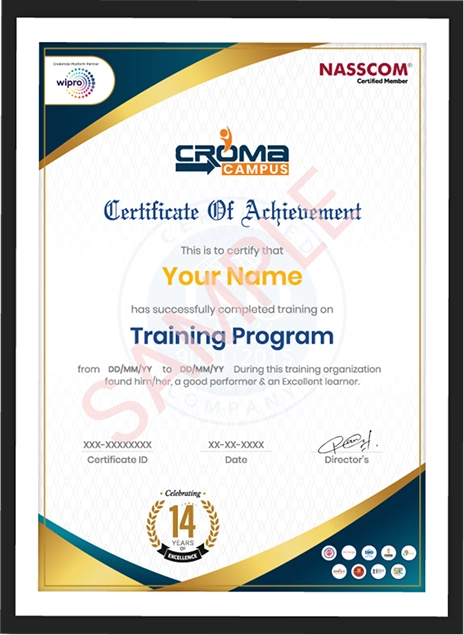
Showcase your Course Completion Certificate to Recruiters

  • checkgreenTraining Certificate is Govern By 12 Global Associations.

  • checkgreen1Training Certificate is Powered by “Wipro DICE ID”
  • checkgreen2Training Certificate is Powered by "Verifiable Skill Credentials"

in Collaboration with

dot-line
Certificate-new-file

Not Just Studying

We’re Doing Much More!

Empowering Learning Through Real Experiences and Innovation

Mock Interviews

Prepare & Practice for real-life job interviews by joining the Mock Interviews drive at Croma Campus and learn to perform with confidence with our expert team.Not sure of Interview environments? Don’t worry, our team will familiarize you and help you in giving your best shot even under heavy pressures.Our Mock Interviews are conducted by trailblazing industry-experts having years of experience and they will surely help you to improve your chances of getting hired in real.
How Croma Campus Mock Interview Works?graph_new

Not just learning

we train you to get hired.

bag-box-form
Request A Call Back

Phone (For Voice Call):

‪+91-828 706 0032

WhatsApp (For Call & Chat):

+91-828 706 0032
          

Download Curriculum

Get a peek through the entire curriculum designed that ensures Placement Guidance

Course Design By

nasco wp

Course Offered By

Request Your Batch Now

Ready to streamline Your Process? Submit Your batch request today!

Students Placements & Reviews

speaker
Sanchit Nuhal
Sanchit Nuhal
speaker
Saurav Kumar
Saurav Kumar
speaker
Mohammad Sar
Mohammad Sar
speaker
Jayad Chaurasiya
Jayad Chaurasiya
speaker
Vikash Singh Rana
Vikash Singh Rana
speaker
Rupesh Kumar
Rupesh Kumar
View More arrowicon

FAQ's

Some basic knowledge of programming (especially in Python) is helpful, but the Master in Generative AI Training in Canada covers essential programming skills.

The course duration is typically 6 to 12 months, depending on whether you study full-time or part-time.

You can work as an AI Engineer, Data Scientist, Machine Learning Engineer, or AI Researcher.

You will work with popular AI tools like TensorFlow, PyTorch, Keras, and Scikit-learn.

AI professionals are in demand in various fields like technology, healthcare, finance, and automotive. You can work in roles such as AI Engineer or NLP Engineer.

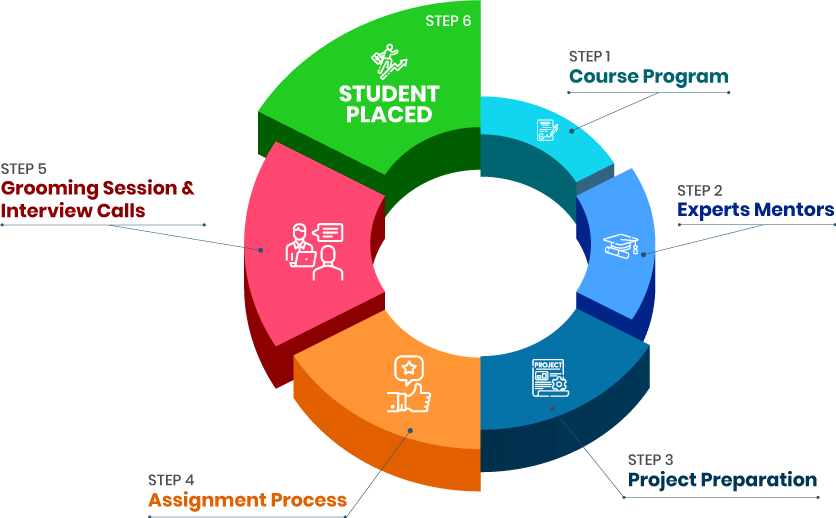
Career Assistancecareer assistance
  • - Build an Impressive Resume
  • - Get Tips from Trainer to Clear Interviews
  • - Attend Mock-Up Interviews with Experts
  • - Get Interviews & Get Hired

Our learners
transformed their careers

highest
35 Laks

Highest Salary Offered

money
50%

Average Salary Hike

building
30K+

Placed in MNC’s

setting
15+

Year’s in Training

alumini
A majority of our alumni

fast-tracked into managerial careers.

Get inspired by their progress in the

Career Growth Report.

FOR VOICE SUPPORT

FOR WHATSAPP SUPPORT

sallerytrendicon1

Get Latest Salary Trends

×

For Voice Call

+91-971 152 6942

For Whatsapp Call & Chat

+91-9711526942
newwhatsapp
1
//