whatsapppopupnewiconGUIDE ME
E3D Online Training

Aveva E3D Online Training in India

This course is perfect for engineers, designers and simulation professionals who are seeking to get real skills in E3D. Learn E3D Online Training step by step with live instructors with practical projects. Begin your E3D course with confidence.
Duration: 7 – 8 Weeks | Mode: Live + Recorded Sessions

Check E3D Training Demo Class

Check our E3D Online Training Demo Class to gain real time learning experience.

Our Recently Placed Students in E3D Course

Anita Deshmukh

Placed at Tata Projects

Pallavi Joshi

Placed at Bechtel

Meena Iyer

Placed at AECOM

Deepak Chawla

Placed at Technip Energies

Amit Kulkarni

Placed at Shapoorji Pallonji Group

Kunal Bansal

Placed at Jacobs Engineering

Suresh Reddy

Placed at Fluor Corporation

Rakesh Patel

Placed at Larsen & Toubro (L&T)
E3D Online Course Videos

About the E3D Training

Our E3D Online Training is designed to give you real-world skills in design and simulation. You’ll learn practical and technical E3D tools that you can use confidently in your work.

Training Highlights
  • Learn from live instructors who guide you step by step.
  • Practice with hands-on labs and real projects.
  • Work on case studies and real-time scenarios.
  • Get updated E3D Training materials.
  • Receive help with resumes and interview preparation.
  • Full placement support to kickstart your career.

What You Get

  • Live classes with access to recordings.
  • Hands-on labs to practice your skills.
  • Real-time project experience.
  • Support for interviews and resume building.

Course Design & Approved By

Nasscom & Wipro

What You Will Learn in E3D Online Training?

Learn E3D fundamentals including equipment modeling, piping design, structural modeling, and project setup. Gain hands-on experience with catalog creation, clash detection, drafting, and report generation. Understand 3D plant design workflows, industry standards.

Core Modules Covered

  • E3D Overview & Workflow
  • Design Modeling & Assemblies
  • Simulation Setup & Analysis
  • Exporting & Reporting
  • Visualization & Rendering
  • Integration with PLM/ERP

Advanced Topics & Projects

  • Equipment modeling and placement
  • Live projects as per industry standards
  • Integration with other piping platforms
  • In detail explanation fo e3d workings
  • Piping design and routing techniques

Download Curriculum

Get a peek through the entire curriculum designed that ensures Placement Guidance

Course Design By

nasco wp

Course Offered By

Why Choose Our E3D Course Material & Resources?

  • Training videos
  • Module-wise notes
  • Real-time business scenarios
  • Practice exercises
  • Project templates

Benefits of Joining Our E3D Training

  • Learn directly from experienced E3D
  • Practice with hands-on labs for real
  • Lifetime access to our LMS
  • Recorded videos to revisit anytime
  • Doubt-clearing sessions
  • Support interviews and job placement
Learners Reviews

“I found the E3D course at Croma Campus very useful for career growth. Real-world scenarios, expert trainers, and good support.”

— Vardaan, Admin E3D

“Highly satisfied with the E3D course from Croma Campus. Practical sessions, knowledgeable trainers, and industry-relevant content helped.”

— Vihan, E3D Administrator

“The E3D training by Croma Campus covers both basics and advanced topics perfectly. Live project exposure and trainer guidance.”

— Gaurav, Structural Designer E3D

“The E3D course at Croma Campus is very practical and industry-focused. Trainers explained concepts clearly with real-time examples.”

— Vaibhav, Electrical E3D Designer

“Got my first job after completing the course in a month. E3D course gives you all the understanding of all skills.”

— Sachin, Piping Designer

“I joined the E3D Course and it was the best decision. The course is practical and helped me with real project work.”

— Vineet, E3D Piping Designer
E3D - Country-wise Job Profiles & Salary Guide

Top Job Profiles:

  • E3D Designer
  • E3D Engineer

Average Salary Range:

  • INR 4 LPA - INR 10 LPA (Entry Level)
  • INR 8 LPA - INR 15 LPA (Mid Level)

Top Job Profiles:

  • E3D Engineer
  • Consultant

Average Salary Range:

  • $70,000 - $130,000 (Entry Level)
  • $90000 - $150,000 (Mid Level)

Top Job Profiles:

  • E3D Consultant
  • Designer

Average Salary Range:

  • £40,000 - £75,000 (Entry Level)
  • £35,000 - £60,000 (Mid Level)

Enroll Today

Begin your E3D career with our E3D Course. Learn design and simulation workflows in a simple, practical way that you can apply right away by enrolling in our E3D Online Training.

About the Trainer

Learn from an E3D expert with real industry experience in design, simulation, and deployment projects. Your trainer has worked with top companies and helped many professionals grow.
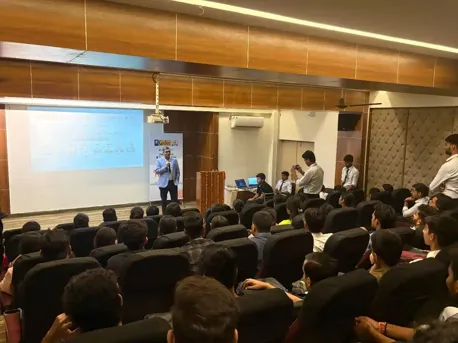
  • Strong experience in E3D design and simulation workflows
  • Has conducted many corporate and online training batches
  • Shows real projects from start to finish
  • Guides you through hands-on lab exercises
  • Helps you prepare for interviews and job opportunities
Frequently Asked Questions

Yes, you might consider this course a rare one, but it's genuinely one of the most looked-for courses.

Well, by enrolling in this course, you will get a chance to know about powerful visualization, clash-free, multi-discipline 3D design, and consecutively generating accurate drawings and reports to reduce costs respectively.

This specific course will not take more than 35-40 days to completely analyze this functionality.

The course covers all the basics modeling, simulation, reporting and hands-on labs.

Yes, absolutely. From the basics, to making it ideal for freshers, engineers, and designers.

During the sessions you will get the updated notes, videos, assignments, and project templates that will support your learning journey.

Although the training is live under experts training, the recorded videos for later revision.

We offer resume building, interview preparation and job assistance till you get a job.

CURRICULUM & PROJECTS

E3D Admin Certification Training

    Overview of E3D & E3D ADMIN

    E3D Module Types & purpose

    E3D Admin login

    Purpose of User & MDB

Get full course syllabus in your inbox

    Project Creation & Setup

    E3D Project Structure

    Project backup

    Restore project

    Evers file modification

    project code

    project variables folder

    Detail of project

Get full course syllabus in your inbox

    E3D Admin Login (Summary).

    Teams and Users creation

    Modification of Team & Users

    Multiple Data Base (MDB)

    Creating the Main Admin Elements

    Create new Database and Extracts

    Databases (Creating, Modifying, Deleting)

    Make Utility

    Display Mode

    Integrity Checker

    Configuring the Admin Element form

    Copy teams and users

    Multi write database and extracts

    Project Administration

    Replicating a Project

    NT Authentication

    How modules are defined

    Administrator command

    Transaction Database

    Locking the project Database

Get full course syllabus in your inbox

    Create catalogue form

    Catalogue Database Structure

    Create section form

    Piping Sections/Categories

    Parameters

    • Component Parameters
    • Insulation Parameters
    • Structural Parameters
    • Design DB Parameters

    3D Geomset Primitives & Negative 3D Geomsets

    Constructing 3D Pointsets

    Geomset Primitive Representation

    3D Pointsets

    Create part world form

    Create family form

    Create category form

    Catalogue property definitions form

    Text definition form

    Detail and material text

    Properties form

    Convert SPEC form

    Utilities

    Create, Categories and Templates

    Understanding parameters

    Nozzle Specification form

    Create specification form

    Create category for room design

    Draft symbol set

    Basic Element Operation Commands

    COCO TABLES

    Bolting Tables

    Error Messages

Get full course syllabus in your inbox

    Introducing SPECON

    Catalogue and specification

    How to use SPECON

    Create Specification World Form

    Create Specification Form

    Create Part World Form

    Create Part Family Form

    Create DTSE Form

    Convert Spec Form

    Details of typical specifications

    Spec Generator Specific Tools

    Specification Structure Form

    Nozzle Specification Form

    Create Specification Form

    Bolting Specifications

    Command syntax diagrams

    Error Messages.

Get full course syllabus in your inbox

    Introduction

    Properties data

    Design layout data

    Material property data

    Case data

    Component data

    Constraint’s data

    Run data

    General commands

    Use of groups

    PROPCON syntax Graphs

    The properties database elements

Get full course syllabus in your inbox

    Starting Lexicon

    Dictionary Explorer

    Current Element Editer

    Creating Element

    Create UDA or USDA

    Create a UDET

    UDA Attributes

    Valid Values

    Limits

    Creating new UDAs & copying UDA Definitions

    Use of Goto

    Handling of UDA in Reports and Expressions

    Handling of UDAs in data output Macros

    Handling OUDAs in Project Reconfiguration

    SPEC Selection

Get full course syllabus in your inbox

    Setting the system defaults

    Layer purpose Definitions

    Sheet size defaults

    Setting plotting options

    Changing your working library

    Sheet library Administration

    Symbol library Administration

    Lab library Administration

    Style library Administration

    Representation library Administration

    Draw list library Administration

    Tag rule library Administration

    Libraries supplies with draft

Get full course syllabus in your inbox

    Command Summary

    Setting UP ISO Draft

    Bolting

    Design Requirements

    Piping components in ISODRAFT

    Customising the drawing Sheet

    Material list and reports

    ISO Metric drawings

    Alphabetical Command reference

    Symbol keys

    Alternative Text

    Material Control file

    Standard ISO options creating Modifying

    Options E Plotting

Get full course syllabus in your inbox

    Design Templates

    Quary data access control

    • User Right
    • Element Access

    Settings Purposes

    How to customization Commands

    Command window

    Settings Check Defaults

    Import Equipment

    Standard Equipment Catalogue Creating

    Export

    Representation.

    System Hierarchy

Get full course syllabus in your inbox

+ More Lessons

Course Design By

naswipro

Nasscom & Wipro

Course Offered By

croma-orange

Croma Campus

Our Students' Projects
1775045942.jpeg
Larsen & Toubro – E3D Industrial Equipment Design

Scenario: L&T used E3D for heavy engineering equipment modeling.

Live Work:
  • Creating complex equipment layouts
  • Defining piping and mechanical structures
  • Ensuring design compliance with industry standards
  • Reviewing clash detection reports

Outcome: Accurate designs with reduced rework.

1775045895.jpeg
Tesla – E3D Product Design Optimization

Scenario: Tesla implemented E3D to redesign electric vehicle components for faster prototyping.

Live Work:
  • Creating parametric 3D models for EV parts
  • Managing assemblies with 1,000+ components
  • Applying material properties and tolerances
  • Running design validation checks

Outcome: Reduced design cycle time and improved.

1774959445.jpeg
Honeywell – E3D Engineering Design Automation

Scenario: Honeywell adopted E3D to automate engineering design workflows.

Live Work:
  • Developing intelligent 3D models
  • Standardizing component libraries
  • Automating repetitive design tasks
  • Generating reports and drawings

Outcome: Increased productivity & reduced manual design.

1774959384.jpeg
Tata Steel – E3D Structural Design Project

Scenario: Tata Steel used E3D to modernize structural design processes.

Live Work:
  • Creating 3D structural frameworks
  • Applying load and stress parameters
  • Reviewing design accuracy and safety
  • Preparing fabrication-ready models

Outcome: Designs with improved structural reliability.

1774959321.jpeg
Hyundai – E3D Manufacturing Plant Layout

Scenario: Hyundai implemented E3D for production facility planning.

Live Work:
  • Designing factory floor layouts
  • Modeling machinery and workflow paths
  • Updating layouts based on process changes
  • Coordinating with cross-functional teams

Outcome: Optimized plant layout.

1774959240.jpeg
Siemens – E3D Smart Infrastructure Modeling

Scenario: Siemens leveraged E3D for smart infrastructure projects.

Live Work:
  • Creating 3D layouts for electrical systems
  • Integrating mechanical and structural designs
  • Reviewing design simulations
  • Generating design documentation

Outcome: Poject visibility & reduced design error.

1774959112.jpeg
Bosch – E3D Automotive Component Development

Scenario: Bosch integrated E3D to streamline automotive part design.

Live Work:
  • Developing 3D component drawings
  • Managing design libraries and templates
  • Performing tolerance analysis
  • Supporting prototype validation

Outcome: Improved design consistency & faster prototyping.

1774434220.webp
Samsung – E3D Consumer Electronics Modeling

Scenario: Samsung adopted E3D to enhance product visualization for mobile devices.

Live Work:
  • Designing 3D models of smartphone components
  • Managing multi-layer assemblies
  • Implementing design revisions and version control
  • Preparing models for manufacturing teams

Outcome: Faster product approvals and improved design.

Recent E3D Training Job Requirements
Junior E3D Engineer

Company: Tata Projects

Location: Hyderabad

Experience: 1–3 Years

Required Skills: Structural Modeling, Piping Layouts, Drafting

E3D Piping Designer

Company: Technip Energies

Location: Chennai

Experience: 0–2 Years

Required Skills: AVEVA E3D Piping, 3D Modeling, Material Take-Off (MTO)

E3D Design Engineer

Company: Larsen & Toubro (L&T)

Location: Mumbai

Experience: 0–2 Years

Required Skills: AVEVA E3D Modeling, Equipment & Piping Design

Who Can Do the E3D Course?
  • Backgrounds : B.Tech (Mechanical/Civil/Chemical), Diploma Engineers, BE, BSc.
  • Why: E3D is widely used in engineering design projects, making it ideal for entry-level roles.
  • Best Fit Modules: Equipment Modeling, Piping Basics, Drafting, Isodraft.
  • Background : B.Tech/BE Mechanical, Production, Industrial Engineering.
  • Why: E3D supports detailed mechanical and piping design for process industries.
  • Best Fit Modules: Piping Design, Equipment Modeling, MTO Generation, Clash Detection.
  • Backgrounds : B.Tech/BE Civil, Structural Engineering, Diploma Civil
  • Why: E3D enables accurate 3D structural modeling and integration with piping layouts.
  • Best Fit Modules: Structural Modeling, Supports Design, Layout Coordination.
  • Backgrounds : ITI, Diploma, BE/B.Tech Mechanical.
  • Why: E3D is an industry-standard tool for piping layout and fabrication drawings.
  • Best Fit Modules: Piping Modeling, Isometrics, Spooling, Design Validation.
  • Backgrounds : Mechanical, Chemical, and Instrumentation professionals.
  • Why: E3D helps professionals upgrade skills for complex EPC and plant design projects.
  • Best Fit Modules: Advanced Piping, Design Review, Clash Management, Project Setup.
  • Backgrounds : Non-core engineers with technical interest.
  • Why: E3D offers strong career opportunities in plant design and infrastructure projects.
  • Best Fit Modules: E3D Fundamentals, Piping Basics, Equipment Modeling, Drafting.
E3D Related Courses

Explore E3D related courses covering piping, equipment, and plant design skills.
Piping Design Online Course

In-brief knowledge of Piping Design course for full skill development.
SP3D Training

Complete SP3D training for understanding core engineering industries.

Caesar II Training

Enroll in the Caesar II Training course to get brief understanding of new piping systems.

PDMS Training

Complete plant design modeling using AVEVA PDMS workflow.

×

For Voice Call

+91-971 152 6942

For Whatsapp Call & Chat

+91-9711526942
newwhatsapp
1
//