whatsapppopupnewiconGUIDE ME
Salesforce Admin Course

Salesforce Administrator Course Online

Salesforce Administrator Training is ideal for new professionals as well as advanced users interested in gaining experience on how to manage Salesforce applications from scratch to finish. Some of the major topics covered under this training program.
Duration: 6 - 10 weeks | Live Instructor-led + Recorded

Learn Salesforce Admin Demo Classes

The Salesforce Admin Online Course is useful for building a strong base and working on real-time tasks.

Our Recently Placed Students in Salesforce Admin Course

Neelu

Placed at TCS

Surbhi

Placed at Wipro

Nidhi Kaur

Placed at Cognizant

Krunal

Placed at Accenture

Amita

Placed at Capgemini

Ritika

Placed at Infosys

Pramendra

Placed at Deloitte

Madhu

Placed at HCL Technologies
Salesforce Admin Course Videos

About Salesforce Admin Course

By using Salesforce Administrator Training, you will be able to get knowledge about how organizations handle their customers' information. Step by step you will learn about user setup, data management, reporting, and automation. Salesforce Administrator Online Course is a practical course which concentrates on practice.

Training Highlights
  • Live instructor-led Salesforce Admin Classes
  • Full hands-on Salesforce sandbox access
  • Certification-focused Salesforce Admin Course
  • Real-time case studies and live projects
  • Updated learning material
  • Resume building and interview support
  • Full placement assistance

What You Get

  • Get live training with trainer guidance
  • Get recorded sessions for revision
  • Get hands-on experience with real tools
  • Get support for interviews and placement
  • Get help in building your resume

Course Design & Approved By

Nasscom & Wipro

What Will You Learn in Salesforce Admin Course

You will understand how Salesforce Administrator Course in real companies. You will learn user setup, data handling, reports, dashboards, and automation. The Salesforce Admin Online Course is hands-on so you can manage real tasks easily.

Salesforce Admin Exam Overview

  • Category: Beginner to Advanced
  • Duration: Depends on training program
  • Type: Practical + theory
  • Fee: Depends on institute

Advanced Topics & Use Cases

  • Introduction to Salesforce platform
  • User and role management
  • Data management and security
  • Reports and dashboards
  • Workflow and automation tools
  • Real-world task handling and case study

Download Curriculum

Get a peek through the entire curriculum designed that ensures Placement Guidance

Course Design By

nasco wp

Course Offered By

Why Choose Salesforce Admin Course Online

  • Self-paced learning
  • Ideal for beginners
  • Industry tools and practices
  • Hands-on learning
  • Job-focused training

Benefits of Joining Our Salesforce Admin Course

  • Gain insight into Salesforce Job
  • Hands-on experience Practical
  • Learn to manage users
  • Perform data management practices
  • Create basic reports and dashboards
  • Develop automation of day-to-day
Learners Reviews

“My doubts about reports and data are clear now. I can understand and handle data in Salesforce much better.”

— Roshan Mehra, Data Analyst

“I started with no knowledge at all. Now I understand basic admin work and can do simple tasks in Salesforce.”

— Pratibha Rana, Fresher

“Now I understand how CRM systems work. The training helped me connect business work with Salesforce in a simple way.”

— Vandana Iyer, Business Analyst

“Real tasks made learning easy. I could understand how things work in real jobs and use Salesforce better now.”

— Adarsh Singh, Working Professional

“Good course for beginners. It explained everything in a simple way and helped me understand basic Salesforce concepts clearly.”

— Khyati Kulkarni, IT Graduate

“The sessions were very simple and easy to understand. Now I know how Salesforce works in day to day work.”

— Yogesh Verma, IT Trainee
Salesforce - Countrywise Job Profiles & Salary Guide

Top Job Profiles:

  • Salesforce Admin
  • CRM Executive
  • Salesforce Support
  • Junior Admin

Average Salary Range:

  • INR 3 LPA - INR 7 LPA (Entry Level)
  • INR 8 LPA - INR 18 LPA (Mid Level)
  • Up to 25+ LPA (Senior Level)

Top Job Profiles:

  • Salesforce Administrator
  • CRM Analyst
  • Salesforce Consultant

Average Salary Range:

  • $75,000 - $100,000 (Entry Level)
  • $110,000 - $140,000 (Mid Level)
  • $150,000+ (Senior Level)

Top Job Profiles:

  • Salesforce Administrator
  • CRM Specialist
  • System Admin

Average Salary Range:

  • £35,000 - £60,000 (Entry Level)
  • £65,000 - £90,000 (Mid Level)
  • £95,000+ (Senior Level)

Top Job Profiles:

  • Salesforce Administrator
  • CRM Manager
  • System Analyst

Average Salary Range:

  • CAD 60,000 - CAD 85,000 (Entry Level)
  • CAD 85,000 - CAD 110,000 (Mid Level)
  • CAD 120,000+ (Senior)

Enroll Today

Start your learning journey with the Salesforce Administrator Course and build strong skills in system management.

About the Trainer

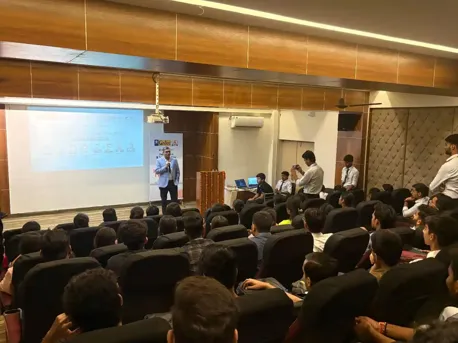
Trainer has more than 5 years of experience in working on Salesforce development. The teaching technique of this trainer is quite simple and easy. The learning process is carried out step by step guide.
  • More than 5 years experience in practical Salesforce
  • Worked on live projects of industry
  • Very simple and easy teaching style
  • Practice-oriented training rather than theoretical
  • Guidance in every step of training
Frequently Asked Questions

There are multiple benefits of becoming a Salesforce Administrator which offer you a high salary & growth.

As we all know the implementation of’ salesforce is only in the IT (Information Technology) industries so knowledge of some technologies is important.

Yes, the career offers out huge salary and post hierarchy simultaneously.

Yes, these are in high demand due to the increasing demand for CRM.

  • An ISO Certified.
  • Personalized sessions.
  • Doubt clearing sessions.

CURRICULUM & PROJECTS

Salesforce Administrator Training Program

    Cloud Computing Overview

    • Introduction to Cloud Computing
    • Introduction to IAAS, PAAS, SAAS
    • Deployment Models
    • Introduction to CRM
    • How can CRM help
    • Evolution of CRM
    • Advantages of CRM
    • A view of available of CRM Products

    Introduction to Salesforce CRM

    • What is Salesforce.com
    • Salesforce CRM Overview
    • Why Salesforce
    • Understanding Salesforce Architecture
    • Services Provided by Salesforce
    • Salesforce Vs Other Cloud
    • Market Demand for Salesforce CRM.
    • Job Market and growth in CMR industry.
    • Salesforce Editions, Licenses and Pricing
    • Salesforce Sandboxes (Dev, QA, Full, Prod.)
    • Creating First SFDC Dev Account
    • Salesforce.com CRM Editions
    • Salesforce.com Navigation Overview
    • Creating Salesforce Developer Account

    Salesforce Applications

    • Sales Cloud, Service Cloud, Custom Cloud
    • Rapid application Development, Cost Reduction & Quality Products

    Salesforce Certifications

    • Certified Administration (201)
    • Certified Advanced Administration (211)
    • Salesforce certified platform developer 1 (PD1: 401)
    • Salesforce certified platform developer 2 (PD2: 501)

    Organization Setup

    • Salesforce Quick Navigation Walk Through
    • Popular Std. Objects and their purpose
    • Set up Menu Intro (Various OOB and Dev Options
    • Popular in different other objects
    • Organization profile, Currency etc.
    • Salesforce User Interface Overview
Get full course syllabus in your inbox

    Objects in Salesforce

    • Types of objects available in salesforce
    • Standard Objects
    • Custom Objects
    • Use of Standard Objects and Custom Objects in Salesforce
    • Difference between standard and custom object
    • Limitations of Standard Objects

    Tabs in Salesforce

    • Introduction to tab
    • Assigning tab to object
    • Types of Tab - Custom Object Tabs, Visualforce, Web tab, Lightning Page tabs

    Intro on various Data Types/Fields

    • Various data type fields creation
    • Standard Data types
    • Read only Data types
    • Relational Data types
    • Roll-Up Summary Fields and its features.
    • Limitations of Roll-up Summary Fields
    • Required, External Id, Default Value and Unique fields

    Object Relationships

    • Introduction to Relationships
    • Need of Relationships in salesforce
    • Brief on Types of relationship
    • Master-Details, Lookup, Self-relationship, External lookup relationship, Indirect lookup relationship, Many-to-many relationships (Junction object), Hierarchical relationship
    • Deep in to Junction object
    • Use of Junction object.
    • Difference between master-detail and lookup relationship How to convert lookup to master details and vice Versa.
Get full course syllabus in your inbox

    Defining Workflows

    Workflow Rules

    Types of evaluation criteria in Workflow rules

    Introduction to Approval Process

    Understanding Approval steps, Approval actions, Rejection actions

    Introduction to process builder and its action

    What is the difference between workflow and process builder

    Workflow Actions

    • Email Alert
    • Task Create
    • Field Update
    • Outbound Message

    Difference between Evaluation Criteria and Rule Criteria

    Workflow Vs Trigger

    Email Templates Overview

    Email Templates for Email Notifications

    Sending Email Templates

    • Sending Single emails
    • Sending Mass emails.

    Types of Templates

    • HTML (Using Letter Head)
    • Custom HTML (without using letter head)
    • Visual force Email Templates
Get full course syllabus in your inbox

    Understanding of formula fields

    Purpose of formula field

    Types of formula field in salesforce

    Text/Logic/Math/Date functions & Other popular functions

    Introduction to cross object formula

    What is the need for object formula

    Introduction to validation rule, Need, and Various popular functions

    What is the difference between the formula field and Rollup summary in Salesforce

Get full course syllabus in your inbox

    Page Layouts

    • Defining Page layouts
    • Field order changes
    • Adding custom buttons and links
    • Defining required and read only fields
    • Adding related list
    • Adding Sections in Detail page

    Record Types

    • To create and maintain record types for your organization.
    • Display different page layouts and picklist values based on record types.
    • Uses of Record Types

    Field Dependencies

    • Controlling field/Dependent field
    • Making dependent pick list fields
    • Limitations
Get full course syllabus in your inbox

    Introduction to User Management, User Object

    Different types of user licenses available - Salesforce, Salesforce Platform

    Roles and Profiles

    Creating Users

    Permission Sets

    Profile Vs Permissions Sets

    Password Policy

    IP Address security

    Login hours & Session settings

    OWD -Public Read/Write, Public Read, private only

    Manage record access with the role hierarchy

    Sharing record-Manual and owner based

    Manage field-level security

Get full course syllabus in your inbox

    Introduction to Data migration

    Overview to Data loader and its installation process Data Loader Action-Insert, Update, Delete, hard delete

    Configure the Data Loader via command line

    Attachment upload with Data loader

    Data Loader Vs Other Third Party ETL Tools

    Introduction to salesforce import wizard

    Mass Transfer Records and Delete of Records

    Difference between Data loader and import wizard

    Mass Transfer Records and Delete of Records

    Back up data with a weekly export

Get full course syllabus in your inbox

    Introduction to Data Visualization-Reports and Dashboard

    Introducing Reports and Custom Reports

    Types of report-Tabular, summary, Matrix, and joint report

    Understanding the formula field and bucket field.

    Add a chart and a few other features like highlighting

    Understanding -Reporting Snapshots, Report types

    Overview to the dashboard and its types

    What is a dynamic dashboard

    Adding Dashboard Snapshots to Home Page

    Understanding Sharing & Security of Reports-Dashboards

Get full course syllabus in your inbox

    What is AppExchange

    Installation of an App

    Uninstall an App

    Create a custom app

    Service Cloud Console

Get full course syllabus in your inbox

    Create flows

    Screen Flows

    Scheduled Trigger Flows

    Auto Launched Flows

    Record Triggered Flows

Get full course syllabus in your inbox

    Create Chatter Group

    Adding User to Chatter Group

    Post Message to Chatter

Get full course syllabus in your inbox

+ More Lessons

Course Design By

naswipro

Nasscom & Wipro

Course Offered By

croma-orange

Croma Campus

Our Students' Projects
1776324595.webp
IBM - Performance Review Salesforce Project

Scenario: What it was about System performance

Live Work
  • Checked system speed during usage
  • Found issues affecting performance
  • Fixed slow processes step by step
  • Updated setup to improve speed
  • Tested system again after changes

Outcome: Performance improved and system worked better

1776324442.webp
HCL Tech - System Check Salesforce Project

Scenario: What it was about System review

Live Work
  • Checked system for errors and issues
  • Improved setup for better performance
  • Maintained system settings regularly
  • Removed unused data and settings
  • Kept system clean and organized

Outcome: System handling improved step by step

1776324292.webp
Wipro - Security Project Management

Scenario: What it was about Data security

Live Work
  • Set permissions for different users
  • Controlled access to sensitive data
  • Assigned roles based on user needs
  • Checked if users had correct access
  • Updated security settings when required

Outcome: Security basics became strong and clear

1776324076.webp
Deloitte - Automation Project Task Management

Scenario: What it was about Task automation

Live Work
  • Created workflows to reduce manual work
  • Set rules for automatic actions
  • Automated daily repeated tasks
  • Tested workflows to check if they work properly
  • Fixed small errors in automation setup

Outcome: Automation basics became easy to understand

1776323718.webp
Capgemini - Dashboard Project Manage

Scenario: What it was about Visual data view

Live Work
  • Created dashboards to show data in simple format
  • Added charts to make data easy to understand
  • Selected key data points for display
  • Tracked changes in data over time
  • Updated dashboard when data changed

Outcome: Dashboard skills became clear and useful

1776323481.webp
Accenture Report - Building Project

Scenario: What it was about Creating reports

Live Work
  • Built reports using available data in the system
  • Filtered data to show only useful information
  • Used basic logic to organize report results
  • Shared reports with users for better understanding
  • Made small changes based on feedback

Outcome: Reporting skills improved better clarity
1776323216.webp
TCS - Data Management Project with Salesforce CRM

Scenario: What it was about: Handling data

Live Work
  • Imported data using simple tools and proper format
  • Cleaned records by removing duplicate entries
  • Updated old data with correct and latest values
  • Checked data quality to avoid errors in the system
  • Maintained proper structure for easy use

Outcome: Data handling became clear to manage

1776322832.webp
Infosys - Managing users with Salesforce Admin

Scenario: What it was about Managing users

Live Work
  • Created users with proper details in the system
  • Assigned roles based on different job requirements
  • Set profiles to control what each user can see
  • Managed access by giving the right permissions
  • Checked and updated user settings when needed

Outcome: User management and access control

Recent Salesforce Admin Job Requirements
Salesforce Support Role

Company: Capgemini

Location: Hyderabad

Experience: 0-2 Years

Required Skills: Admin basics, system handling

CRM Executive

Company: Infosys

Location: Pune

Experience: 0-2 Years

Required Skills: Data handling, dashboards

Junior Salesforce Admin

Company: TCS

Location: Bangalore

Experience: 0-2 Years

Required Skills: Basic admin, reports, data

Our Salesforce Admin Courses

Learn Salesforce Admin skills with hands-on training and real-time projects
Salesforce Business Analyst Course

Build a career as a Salesforce Business Analyst with real-world training in CRM, reporting, and business solutions.
Salesforce Developer Course

Become a skilled Salesforce Developer with practical Apex & Lightning training. Build apps and accelerate tech career.
Salesforce Testing Course

Master Salesforce Testing with real-time projects, automation tools, and expert guidance to boost your career.
Salesforce Course Online

Learn Salesforce online with expert-led training, hands-on projects, and real-time scenarios to boost your career.

Who Can Join a Salesforce Admin Course
  • Why : Easy entry into CRM
  • Best Topics: Basics of admin
  • Job Benefit: Entry-level roles
  • Why : Switch to admin roles
  • Best Topics: Real tasks
  • Job Benefit: Career growth
  • Why : No coding needed
  • Best Topics: Simple system setup
  • Job Benefit: Beginner roles
  • Why : Upgrade skills
  • Best Topics: Advanced admin work
  • Job Benefit: Better roles
  • Why : Understand system flow
  • Best Topics: Reports and dashboards
  • Job Benefit: Better team handling
×

For Voice Call

+91-971 152 6942

For Whatsapp Call & Chat

+91-9711526942
newwhatsapp
1
//